Showing posts with label BW. Show all posts

Friday, October 24, 2008

Fallen Angel


The picture of true innocence! Meet Catherine! My beautiful daughter;-)

Wednesday, October 22, 2008

MEET ZEUS


This is our English Mastiff Zeus. Hes also an important part of our family. He weighs about 260 now. But that is good for his breed. He loves puppies and children. He is so devoted an loyal. We love this guy lots.

Monday, October 6, 2008

Another Catherine Photo

Saturday, July 26, 2008

9 11 Tattoo


Tattoo of a reminder of 9/11!

Thursday, July 24, 2008

Jake And Catherine


Two of my most favorite little people;-) My brother Jacob and daughter Catherine!

Thursday, March 6, 2008

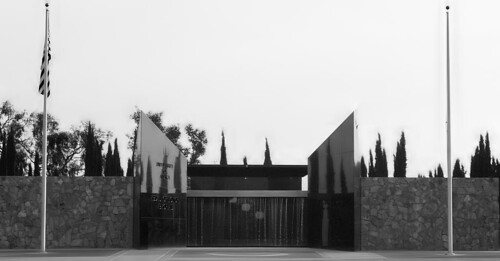
Arlington Cemetary Medal Of Honor Monument


I'M ALREADY HOME!

If you’re reading this…and my mama’s sitting there-
Looks like I only got a one-way ticket over here.

Sure wish I…could give you one more kiss-
War was just a game we played when we were kids.

Well, I’m laying down my gun…I’m hanging up my boots-
I’m up here with God and we’re both watching over you.

So lay me down…in that open field out on the edge of town-
And know my soul…is where my mama always prayed they’d ever go…
If you’re reading this –
I’m already home.

If you’re reading this…half way round the world-
I won’t be there to see the birth of our little girl.

I hope she looks like you…I hope she fights like me-
And stands up for the innocent and the weak.

I’m laying down my gun…I’m hanging up my boots-
Tell dad I don’t regret that I followed in his shoes.

So lay me down…in that open field out on the edge of town-
And know my soul…is where my mama always prayed they’d ever go…
If you’re reading this –
I’m already home.

If you’re reading this…there’s gonna come a day-
When you’ll move on and find someone else and that’s okay.

Just remember this…I’m in a better place-
Where soldiers live in peace and angels sing amazing grace.

So lay me down…in that open field out on the edge of town-
And know my soul…is where my mama always prayed they’d ever go…
If you’re reading this…
If you’re reading this -
I’m already home.

Sung by Tim McGraw but not sure who wrote it!

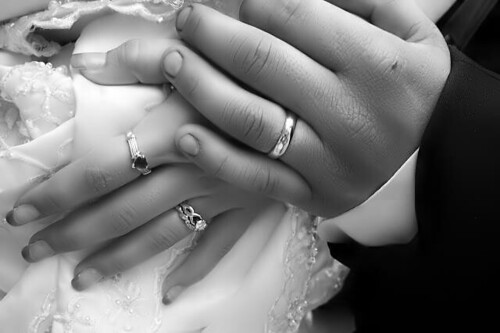
A Promise Of Love Is A Thing Of Beauty


This is titled marriage! It was taken at my cousins wedding! I just wish he hadn't chewed his nails! Love is beautiful! This is a picture of love!

Monday, March 3, 2008

Colorize an Image - Tutorial

1. Download a black & white img
2. Now select the poligonal lasso tool and select an area!
3. Now layer > new adjustment layer > hue/saturation, and use this settings
4. With the poligonal lasso tool select another area of the photo.
5. Apply hue, i use this settings: Select colorize, Hue: 30, Saturation: 25, Lightness: 0
6. Now add the final retouch
You should be finished! How do you like your image?

This is just a simple way of doing this. Remember I use Adobe CS3!

Wednesday, February 27, 2008

Photo retouch for beginners!

In this tutorial I’ll show you a few simple and powerfull way to make you photos look different. This tutorial is written for beginners but maybe even some advanced users can find themselves in here.

Remember: This tutorial will show you a few ways you can use when you’re retouching your pictures.

Use this tutorial only for your learning purposes.

1. Our first way will be Curves!

Go to Image -> Adjustments -> Curves (CTRL + M)
Choose a setting what you like the most.
I use input 126 and output 9!

Now, let’s go to step 2 of this tutorial.
2. In this step we will play with layers a little.
So again, open up your image.

Now, copy this layer. As a Layer blending mode set Linear burn and play with the Layer opacity.
I set opacity to 80%.

3. In this step we will use Levels.
Once again, open up your picture.

Now, go to Image -> Adjustments -> Levels (CTRL + L)
Play with a settings untill you get what you want.

Input levels are 115 / 1,30 / 255 !
Output levels are 0 / 255 !

4. This step is we’ll use Gradient Map, and also we will use black and white picture.
This is one way that I’m using a lot. It makes me feel powerfull. I can make beautiful B&W pictures in just a few moments.

Open up your picture! I simply converted in to B&W by going to Image -> Mode -> Grayscale!

Go to Image -> Adjustments -> Gradient Map Choose Black and White as a gradient.

Double click on gradient track and set settings until you get what you want.
I set them Gradient Sloid and Smoothness 100. I set stops black and location %20!

These are four asy steps that everybody should know. Now, you’ve got whole spectre of tools and filtersyou can use, so why stop here? Grab a tool a start mixing, retouching, burning….everything!